
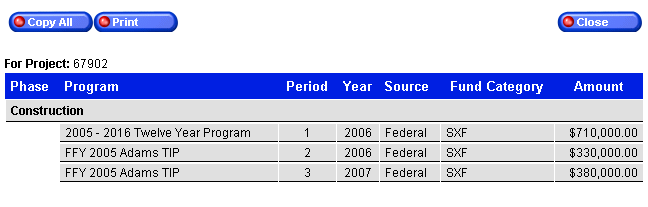
When clicking the  button a screen will be displayed
which lists the project phase(s),
program information, funding sources, funding categories and actual amounts.
button a screen will be displayed
which lists the project phase(s),
program information, funding sources, funding categories and actual amounts.
Click the  button to copy the displayed data and paste
into a Word, Excel or other application.
button to copy the displayed data and paste
into a Word, Excel or other application.
Click the  button to print the displayed data.
Click the  button to exit the screen.
 Go to
the Legislators, Milestones
and GIS Map pages for further explanation of
these features.
Go to
the Legislators, Milestones
and GIS Map pages for further explanation of
these features.